
Securing a modern living space or office usually presents an annoying trade-off. Traditional security systems are robust, but they are also glaringly obvious. Large, blinking cameras mounted in plain sight can create an uncomfortable atmosphere for guests, clients, or family members. On the flip side, completely hidden recording systems historically suffered from poor video resolution, complicated storage setups, and unstable wireless connections.
The residential surveillance market has seen an influx of ultra-compact monitoring systems designed to bridge this exact gap. The SpyFocus Mini WiFi Camera positions itself as a practical option for anyone who requires reliable, high-definition, and highly discreet environmental monitoring without recurring monthly platform costs. This analysis provides an objective evaluation of the hardware capabilities, real-world utility, and system integration of the device.
What is the SpyFocus Mini WiFi Camera?
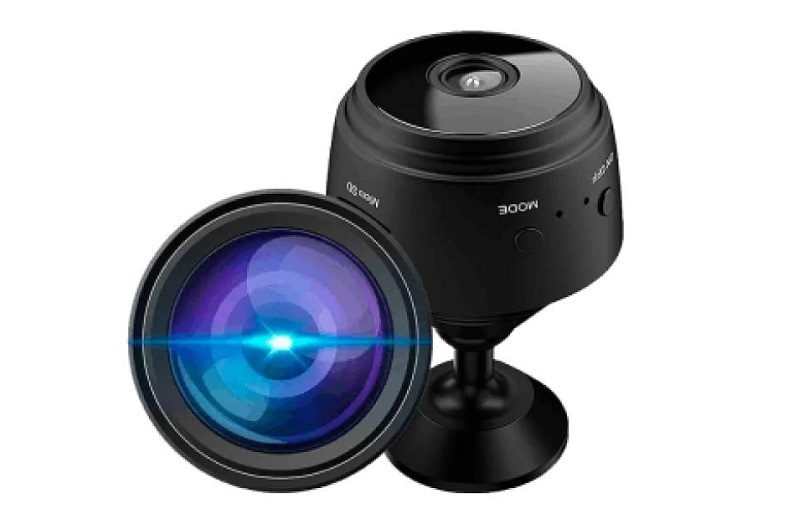
The SpyFocus Mini WiFi Camera is a compact wireless camera designed for basic indoor monitoring. Its main appeal is size: it is small enough to blend into a shelf, desk, or other everyday setting without feeling bulky. The camera connects to a mobile app, streams video over WiFi, and can record locally to a microSD card.
For many buyers, the draw is convenience. You do not need a large setup, complicated wiring, or a separate recorder. If the product performs as described, it can cover the kind of everyday monitoring most people actually need.
Technical Specifications and Hardware Architecture:
At its core, the unit is an ultra-small wireless surveillance node. Unlike older analog hidden systems that required external capture cards or extensive wiring networks, this camera packages its optical sensor, processing unit, storage controller, and wireless radios into a chassis roughly the size of a large coin.
Primary Optical and Physical Features
-
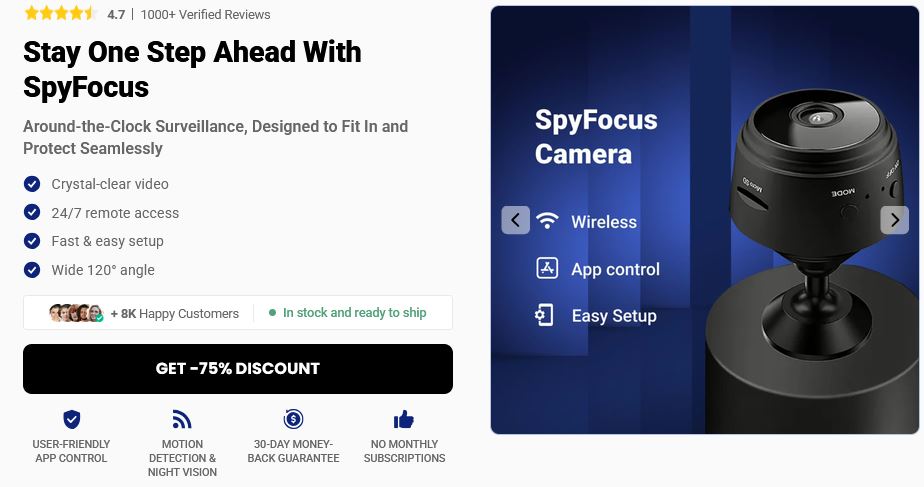
Field of View: 120-degree wide-angle lens. This specific angle provides adequate spatial coverage of a standard residential room or office space without introducing severe barrel distortion (the “fisheye” warping effect common in wider lenses).
-
Video Fidelity: High-definition video transmission with active image stabilization. The device processes color balancing and contrast autonomously to adapt to shifting ambient lighting.
-
Night Vision Infrastructure: Integrated infrared (IR) LED arrays that operate on a spectrum invisible to the human eye. This allows the device to capture low-light environments without projecting a visible red glow.
-
Local Storage Interface: MicroSD card slot supporting loop-recording functionality, eliminating mandatory cloud infrastructure dependencies.
-
Form Factor: Matte-black cylindrical chassis optimized for low light-reflection and blending into shadowed structural corners or shelving arrangements.
System Integration: How the Ecosystem Operates
Understanding how the system interfaces with local networks is critical for evaluating its day-to-day utility. The device relies entirely on digital wireless data transmission.
The camera establishes a digital handshake with your local 2.4GHz Wi-Fi network. Once connected to an internet-facing router, the camera pipes its encrypted video stream through a secure connection to the dedicated mobile software companion. Users install this companion application on an iOS or Android smartphone, establishing a direct remote portal to monitor the camera feed from any location with an active cellular or internet data link.
For deployments lacking an accessible Wi-Fi network—such as temporary construction sites, remote storage units, or vehicles—the system supports an internal point-to-point wireless mode. In this topology, the camera acts as its own localized wireless access point. A smartphone can connect directly to this localized broadcast signal to review footage or adjust settings, provided the operator stands within physical proximity of the hardware unit.
Critical Performance Capabilities:
A thorough analysis of any surveillance hardware requires looking past marketing bullet points to see how the integrated components perform under varying real-world conditions.
1. Optical Clarity and Sensor Performance
During daylight hours, the optical sensor delivers sharp details with accurate color representation. It can clearly distinguish facial features, text on documents, and specific individual movements within a radius of 15 to 20 feet. When ambient light drops below a specific threshold, the system automatically cuts its physical IR filter to engage the infrared illumination array. The black-and-white night vision mode maintains satisfactory contrast, though high-motion objects close to the lens can occasionally experience slight ghosting or motion blur due to prolonged sensor exposure timing.
2. Motion-Activated Power Management
Continuous streaming drains small battery modules quickly. To counteract this limitation, the internal software utilizes a pixel-analysis algorithm to detect movement. When a change in the field of view crosses a predefined sensitivity threshold, the device snaps out of its low-power standby state to log video locally and dispatch an instant push notification to the user’s paired mobile device.
3. Localized Storage Topology and Loop Integration
By opting for a local MicroSD card architecture, the device avoids forcing users onto a recurring cloud subscription model. When the storage card reaches maximum capacity, the internal file manager performs automated loop recording. It systemically overwrites the oldest unflagged media folders with new files, ensuring continuous functionality without requiring manual file purges.
Real-World Benefits Of SpyFocus Security Camera:
The SpyFocus Mini WiFi Camera makes the most sense in ordinary, practical situations.
-
It can help parents keep an eye on a baby’s room or play area.
-
It can help pet owners check in on pets while away from home.
-
It can serve as a simple indoor camera for a home office, hallway, or entry point.
-
It can be useful for checking on package deliveries near a door or common area.
-
It may work well as a temporary camera in a rental, guest room, or small workspace.
The value here is not sophistication. It is convenient. People often want a camera because they want a quick answer to a simple question: “What is happening here when I’m not looking?” This camera is aimed at that kind of use.
Who Does It Make Sense For?
This type of camera is a reasonable fit for people who want low-friction monitoring. That includes renters, pet owners, parents, and anyone who wants a portable camera they can move from one place to another.
It may also appeal to people who do not want a monthly cloud bill. Local storage is a major plus for users who prefer keeping footage on a card instead of paying for ongoing access.
Operational Strengths and Weaknesses of SpyFocus Security Camera:
Evaluating the operational balance of the device ensures realistic expectations regarding performance and long-term utility.
Advantages
-
Discreet Profile: The minimal physical footprint allows placement in dense shelving, decorative items, or small crevices without catching the eye.
-
Zero Subscriptions: All local capture, processing, and remote application usage features work completely out of the box without hidden platform fees.
-
Flexible Power Input: Runs on its internal battery cell for short deployments or hooks up to continuous USB mains power via a standard adapter for long-term recording.
-
Straightforward Local Backups: The loop-recording MicroSD slot makes raw data recovery simple via any standard personal computer or laptop reader.

Disadvantages
-
Acoustic Limits: The micro-microphone captures general ambient audio well, but it can struggle with faint whispers or clarity in rooms with high echo or background noise.
-
Local Storage Not Included: The basic retail packaging generally omits a MicroSD storage card, meaning users must purchase a compatible high-speed card separately before deployment.
-
Dependency on local Wi-Fi stability: If the local internet drops or the wireless router resets, remote viewing access is paused until the connection naturally stabilizes.
Set up Methodology and Network Configuration
Getting the device connected requires following an exact, sequential technical process to ensure a stable wireless handshake.
-
Hardware Pre-Charging and Activation: Connect the camera to a stable USB power source using the included cable. Allow the internal battery to reach maximum capacity before attempting system configuration. Toggle the power switch to the active position until the onboard LED indicator signals initialization mode.
-
Mobile Software Installation: Download the authorized companion software from the official iOS App Store or Google Play Store. Ensure your smartphone’s Bluetooth and Wi-Fi modules are turned on, and that your phone is explicitly connected to your property’s 2.4GHz network band.
-
Establishing Device Network Sync: Open the mobile application and select the ‘Add New Device’ prompt. Follow the screen instructions to read the camera’s temporary direct-broadcast Wi-Fi signal, which links your smartphone directly to the hardware.
-
Router Handshake and Final Mounting: Input your permanent home or office network credentials into the application interface. The app will push these settings to the camera, allowing it to drop its temporary signal and link directly to your router. Once the indicator LED stabilizes, position the unit in its final deployment spot.
Safety and Privacy:
Any camera connected to WiFi deserves careful use. The biggest risks are usually not physical damage but privacy mistakes.
-
Use a strong password.
-
Change default login details right away.
-
Update the app and firmware if updates are available.
-
Do not place the camera in private areas where recording would be inappropriate or illegal.
-
If you use it in a shared home, make sure everyone understands where it is and what it records.
These points matter because small cameras are easy to forget about after setup. That is exactly why they should be configured carefully from the start.
Regulatory Compliance and Legal Considerations
Because compact cameras can be placed out of sight, users must carefully navigate privacy laws when deploying them.
Legal Protocol for Surveillance: Recording video in areas with a reasonable expectation of privacy—such as bathrooms, locker rooms, or designated guest bedrooms—is widely illegal without explicit, written consent.
Additionally, recording audio often falls under different legal rules than recording video. Many jurisdictions require two-party or all-party consent before audio can be legally taped. If you are using this device in a workplace or public environment, check your local statutes. You may need to post visible signage notifying visitors of active security recording to keep your data legally compliant and admissible as evidence.
What Users Tend to Say
Customer feedback on cameras like this usually falls into two camps. Some users like the size, quick setup, and motion alerts. Others are less impressed by app stability, connection reliability, or the actual image quality in low light.
That split is not unusual. Mini WiFi cameras often look great in product descriptions, but the experience can depend heavily on signal strength, app quality, and how the camera is placed. A well-positioned camera on a strong network usually performs better than one buried in a weak WiFi zone.
Pricing and Buying Advice:
The device is sold through authorized web portals, ensuring that consumers receive verified hardware updates and official warranty support rather than unvetted third-party lookalikes.
Purchasing Options
-
Single Unit Deployment (£39.99): Intended for targeted single-room monitoring or specific entryway tracking.
-
Multi-Room Security Bundles (£29.45 each): Multi-camera kits are available at a lower per-unit cost, allowing users to build a coordinated network across multiple rooms or floor plans within the same mobile application interface.
Purchase Safeguards
Every transaction processed through the official distributor channels is backed by a 30-day money-back guarantee. If the physical hardware fails to maintain a stable wireless link with your router, or if the video fidelity does not satisfy your operational requirements, you can initiate a standard return protocol within 30 days of your initial purchase date for a refund of the hardware purchase price.
Frequently Asked Questions
Q. Can the camera record if my local internet connection goes down?
Yes. The camera’s local recording capability operates independently of your external internet access. If the Wi-Fi drops out, the device continues to catch motion events and write video directly to the onboard MicroSD card, provided it has power. You will simply lose the live remote-viewing feed and smartphone push notifications until your internet connection comes back online.
Q. How long does the internal battery cell last on a full charge?
When running completely disconnected from wall power, the battery life depends heavily on the volume of motion triggers in the area. In an empty room with minimal activity, the camera can sustain standby mode for several hours. For heavy-traffic zones or multi-day monitoring, connect the unit directly to a continuous USB power adapter.
Q. Does the device support automated recording schedules?
Yes. The companion mobile application contains advanced setting parameters that allow users to program specific operational windows. For example, you can set the system to remain dormant during standard office business hours and automatically engage its motion-detection sensors overnight.
Q. How many separate cameras can be linked to a single smartphone app?
The mobile management ecosystem is designed to scale dynamically. Users can pair multiple camera nodes to a single account profile. This lets you view different rooms or locations through a consolidated grid interface within the smartphone app.
Final Verdict:
The SpyFocus Mini WiFi Camera serves as a practical, reliable option for users who want clean, discreet environmental monitoring without the hassle of permanent wiring or ongoing cloud subscriptions. Its balanced 120-degree field of view, automatic night vision transition, and choice between internal battery or continuous USB power give it excellent versatility across different setups.
While the hardware requires a stable 2.4GHz Wi-Fi network for remote monitoring and demands careful configuration during initial smartphone pairing, it avoids the ongoing subscription costs that plague many major tech brands. For property owners, independent business managers, and renters looking for an unobtrusive security layer that respects the look of their space, this device offers high-tier surveillance performance wrapped in an exceptionally small package.